
Noto Personal Organizer1.40 - Download
You'll be able to download in few seconds.
Publisher Description
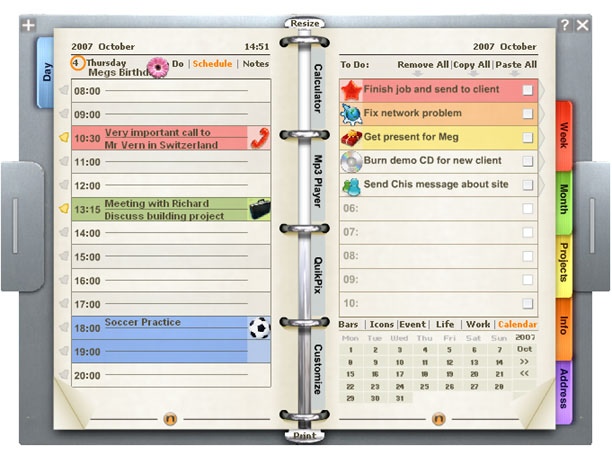
Noto Personal Organizer is a mini application, or window gadget, that you can move around your computer desktop.
It is very easy to use because it works exactly like a real personal organizer, with page turning and separate side tabbed sections, such as: day to view, week to view, month to view, projects section, info section and address book.
It also has added benefits such as a selection bars and icons that can be dragged and dropped within Noto to highlight certain events. Alarms can be set so you dont miss important appointments. There are also embedded gadgets, including a calculator, mp3 player and a memory game.
Noto is customizable with a pre loaded selection of cover designs, icons, gadget designs, and maps. You can add more to your selection by connecting online from within Noto to drag and drop more content from our download section. For example you might want a Van Gogh cover design, a Tokyo underground map, a pink mp3 player, and a scuba diving icon for your calendar.
About Noto Personal Organizer
This PIMS & Calendars program is available in English. It was last updated on 29 September, 2026. Noto Personal Organizer is compatible with the following operating systems: Windows.
The company that develops Noto Personal Organizer is Window Gadgets Inc. The latest version released by its developer is 1.40.
The download we have available for Noto Personal Organizer has a file size of 16.8 MB. Just click the green Download button above to start the downloading process. The program is listed on our website since 2007-10-18 and was downloaded 0 times. We have already checked if the download link is safe, however for your own protection we recommend that you scan the downloaded software with your antivirus. Your antivirus may detect the Noto Personal Organizer as malware if the download link is broken.
How to install Noto Personal Organizer on your Windows device:
- Click on the Download button on our website. This will start the download from the website of the developer.
- Once the Noto Personal Organizer is downloaded click on it to start the setup process (assuming you are on a desktop computer).
- When the installation is finished you should be able to see and run the program.
Program Details
System requirements
Download information
Pricing
Version History
version 1.40
posted on 2007-10-18
Disclaimer
External Download
We do not host Noto Personal Organizer on our servers. We did not scan it for viruses, adware, spyware or other type of malware. This app is hosted by the software publisher and passed their terms and conditions to be listed there. We recommend caution when installing it.
The external download link for Noto Personal Organizer is provided to you by apps112.com without any warranties, representations or guarantees of any kind, so access it at your own risk.
If you have questions regarding this particular app contact the publisher directly. For questions about the functionalities of apps112.com contact us.
